

Kling Videos Generation API Integration Guide
This article will introduce a Kling Videos Generation API integration guide, which can generate Kling official videos by entering custom parameters.
¶ Application Process
To use the Kling Videos Generation API, first go to the Fishapi Cloud Console to obtain your API Token and keep it for later use.

If you have not logged in or registered yet, you will be automatically redirected to the login page to be invited to register and log in, and you will automatically return to the current page after completion.
One API Token can call all platform services; there is no need to apply separately for each service. Your first application will be granted free credits for a free trial; when credits are insufficient, you can recharge your general balance in the Console.
📘 Complete documentation: Kling Videos Generation API →
¶ Basic Usage
First, let's understand the basic usage method: enter the prompt prompt, generation action action, first-frame reference image start_image_url, and model model to obtain the processed result. First, you need to simply pass an action field with the value text2video. It mainly includes three actions: text-to-video (text2video), image-to-video (image2video), and video extension (extend). Then, we also need to enter the model model. Currently, the main models are kling-v1, kling-v1-6, kling-v2-master, kling-v2-1-master, kling-v2-5-turbo, kling-v2-6, kling-v3, kling-v3-omni, and kling-o1. The specific content is as follows:
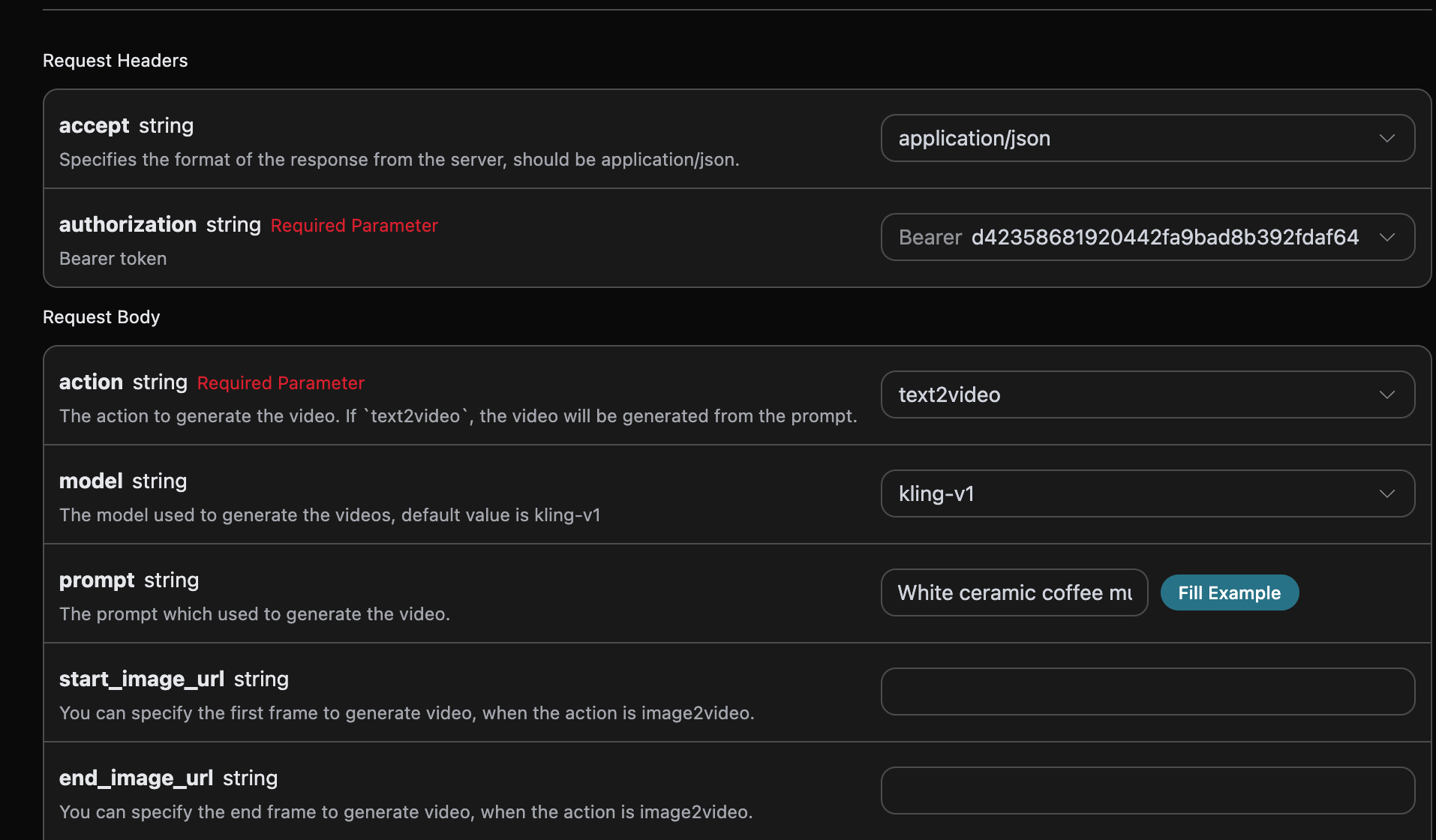
You can see that we set the Request Headers here, including:
accept: The response result format you want to receive. Fill inapplication/jsonhere, which is JSON format.authorization: The key for calling the API, which can be directly selected from the dropdown after application.
Additionally, the Request Body is configured, including:
model: The model for generating videos. The main models arekling-v1,kling-v1-6,kling-v2-master,kling-v2-1-master,kling-v2-5-turbo,kling-v2-6,kling-v3,kling-v3-omni, andkling-o1.mode: The mode for generating videos. Optional values are standard modestd, fast modepro, and native 4K mode4k. Among them,4kis only supported bykling-v3andkling-v3-omni, and is incompatible withcamera_control(camera movement control).action: The action for this video generation task, mainly including three actions: text-to-video (text2video), image-to-video (image2video), and video extension (extend).start_image_url: The uploaded first-frame reference image link required when selecting the image-to-video actionimage2video.end_image_url: Optional for image-to-video, specifies the last frame.duration: Video duration, in seconds.kling-v3andkling-v3-omnisupport integer durations from 3 to 15 seconds;kling-o1only supports 5 seconds; other models support 5 or 10 seconds.generate_audio: Whether to generate audio synchronously, optional, Boolean value. Supported bykling-v3,kling-v3-omni, andkling-v2-6(pro mode only). Defaults tofalse.aspect_ratio: Video aspect ratio, optional, supports16:9,9:16, and1:1, defaulting to16:9.cfg_scale: Relevance strength, ranging from [0,1]. The larger the value, the closer it matches the prompt.camera_control: Optional, object parameters for controlling camera movement, supporting type/simple presets and configurations such as horizontal, vertical, pan, tilt, roll, and zoom.negative_prompt: Optional, negative prompts that you do not want to appear, up to 200 characters.image_list: Omni reference image list, applicable to thekling-o1andkling-v3-omnimodels. For usage, see “Omni Universal Reference” below.video_list: Omni reference video list (supports video editing), applicable to thekling-o1andkling-v3-omnimodels. For usage, see “Omni Universal Reference” below.prompt: Prompt.callback_url: The URL for receiving callback results.async: Optional. When set totrue, the interface immediately returns atask_id, without the need to providecallback_url; then, retrieve the result by polling through the corresponding task query interface.
After selection, you can find that the corresponding code is also generated on the right, as shown in the figure:
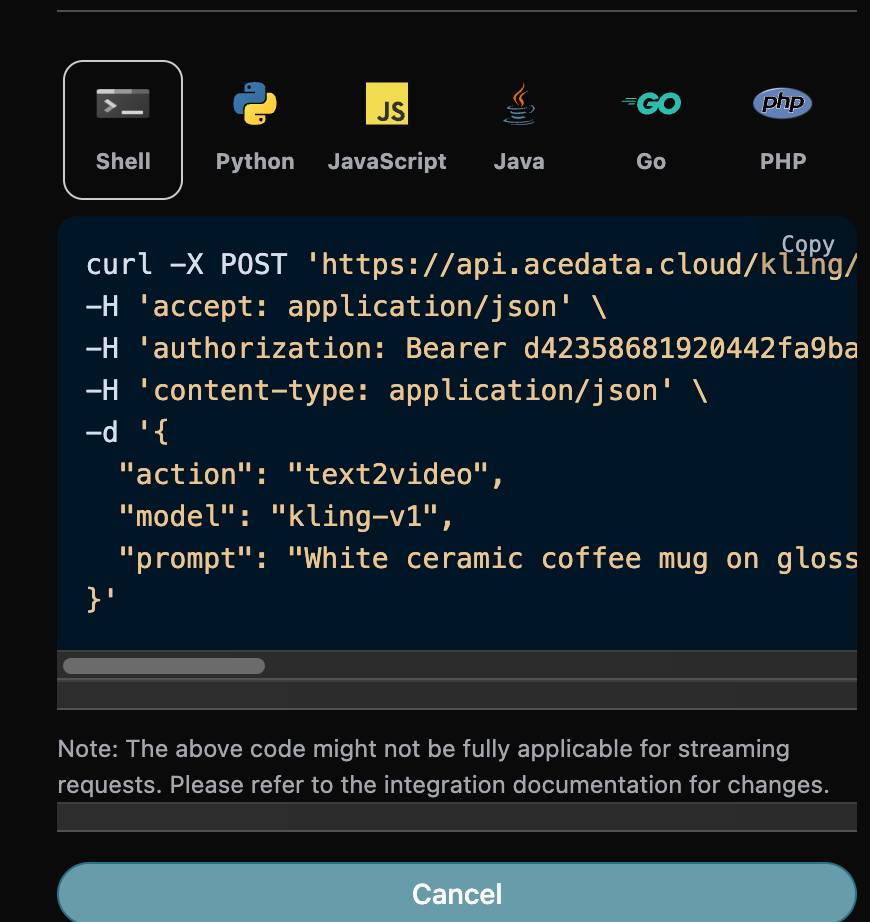
Click the “Try” button to test it. As shown above, we get the following result:
{
  "success": true,
  "video_id": "900798310464749610",
  "video_url": "https://cdn.acedata.cloud/assets/examples/kling/6c68c267-065b-4423-b66b-a0e4c59ee0d5-6a664a591a53.mp4",
  "duration": "5.041",
  "state": "succeed",
  "task_id": "6c68c267-065b-4423-b66b-a0e4c59ee0d5"
}
The returned result contains multiple fields, introduced as follows:
success, the status of the video generation task at this time.task_id, the ID of the video generation task at this time.video_id, the video ID of the video generation task at this time.video_url, the video link of the video generation task at this time.duration, the video link duration of the video generation task at this time.state, the status of the video generation task at this time.
You can see that we have obtained satisfactory video information. We only need to obtain the generated Kling video based on the video link address in data of the result.
Additionally, if you want to generate the corresponding integration code, you can directly copy the generated code. For example, the CURL code is as follows:
curl -X POST 'https://api.fishapi.cloud/kling/videos' \
-H 'accept: application/json' \
-H 'authorization: Bearer {token}' \
-H 'content-type: application/json' \
-d '{
  "action": "text2video",
  "model": "kling-v3",
  "prompt": "White ceramic coffee mug on glossy marble countertop with morning window light. Camera slowly rotates 360 degrees around the mug, pausing briefly at the handle."
}'
¶ Model Capability Matrix
¶ O1 and Omni Reference Video Billing
kling-o1 is billed based on the mode and whether video_list is provided. The following are the prices for a 5-second completed video:
| Mode | No Reference Video | With Reference Video |
|---|---|---|
| std | 4.005 Credits | 6.010 Credits |
| pro | 5.340 Credits | 8.010 Credits |
Successful requests for kling-o1 and kling-v3-omni with reference videos are charged based on billable seconds: std is 1.202 Credits/second, and pro is 1.602 Credits/second. For example, generating 5 seconds in std mode costs 6.010 Credits. Omitting video_list will not trigger the reference video tier; image_list, start-frame images, and end-frame images also do not count as reference videos. Reference videos cannot be used together with generate_audio=true. |
Video editing with refer_type=base (default) may follow the reference video duration, and the final charge is based on the actual completed video duration rounded to an integer number of seconds: for example, 5.708 seconds is charged as 6 seconds, and 5.041 seconds is charged as 5 seconds. refer_type=feature uses the requested duration. usage.reference_video_seconds in the response provides the final billable seconds; the estimated price at request time may differ from the final deduction.
Support for parameters varies greatly across different models. The following matrix is compiled from the official Kling video models documentation. Before calling, please verify whether the current model / mode / duration combination supports the features you need; otherwise, errors such as model/mode/duration(...) is not supported with image_tail will be returned.
| Model | Mode | end_image_url (start/end frames) |
generate_audio (audio) |
camera_control (camera movement) |
Notes |
|---|---|---|---|---|---|
kling-v1 |
std / pro | ✅ Only duration=5 |
❌ | ✅ Only duration=5 |
extend does not support negative_prompt and cfg_scale |
kling-v1-6 |
std | ❌ | ❌ | ❌ | Multi-image-to-video and all extend modes are available |
kling-v1-6 |
pro | ✅ | ❌ | ❌ | |
kling-v2-master |
— | ❌ | ❌ | ❌ | Single mode, only duration=5/10 |
kling-v2-1-master |
— | ❌ | ❌ | ❌ | Single mode, only duration=5/10 |
kling-v2-5-turbo |
std | ❌ | ❌ | ❌ | |
kling-v2-5-turbo |
pro | ✅ | ❌ | ❌ | |
kling-v2-6 |
std | ❌ | ❌ | ❌ | |
kling-v2-6 |
pro | ✅ | ✅ | ❌ | The only non-v3 model that also supports audio |
kling-v3 |
std / pro | ✅ | ✅ | ✅ | duration range is 3–15 seconds |
kling-v3 |
4k | ✅ | ✅ | ❌ | 4K mode is incompatible with camera movement |
kling-v3-omni |
std / pro / 4k | ✅ | ✅ | ❌ | |
kling-o1 |
std / pro | ✅ | ❌ | ❌ | Only supports duration=5 |
Notes:
mode=4kis supported only bykling-v3andkling-v3-omni; it is also mutually exclusive withcamera_control(camera movement).end_image_urlcan only be used together withstart_image_urlwhenaction=image2video. Passing onlyend_image_url(withoutstart_image_url) will be rejected.kling-v3/kling-v3-omniaccept any integerdurationfrom 3–15 seconds;kling-o1accepts only 5; all other models accept only 5 or 10.generate_audiodefaults tofalse. It is supported only bykling-v3,kling-v3-omni, andkling-v2-6(pro mode).
¶ Video Extension Feature
If you want to continue generating an already generated Kling video, you can set the parameter action to extend, and input the ID of the video that needs to be continued. The video ID can be obtained according to the basic usage, as shown in the image below:

At this point, you can see that the video ID is:
"video_id": "030bb06d-98d4-4044-9042-0aa0822e8c8c"
Note that the
video_idin the video here is the ID of the generated video. If you do not know how to generate a video, you can refer to the basic usage above to generate a video.
Next, we must fill in the prompt needed for the next extension step to customize the generated video, and can specify the following content:
model: The model for generating videos, mainly includingkling-v1,kling-v1-5, andkling-v1-6models.mode: The mode for generating videos, with optional values being standard modestd, fast modepro, and native 4K mode4k(supported only bykling-v3andkling-v3-omni, incompatible with camera movement control).duration: The video duration for this video generation task, mainly including 5s and 10s.start_image_url: When selecting the image-to-video actionimage2video, the uploaded first-frame reference image link is required.prompt: Prompt.
The filling example is as follows:
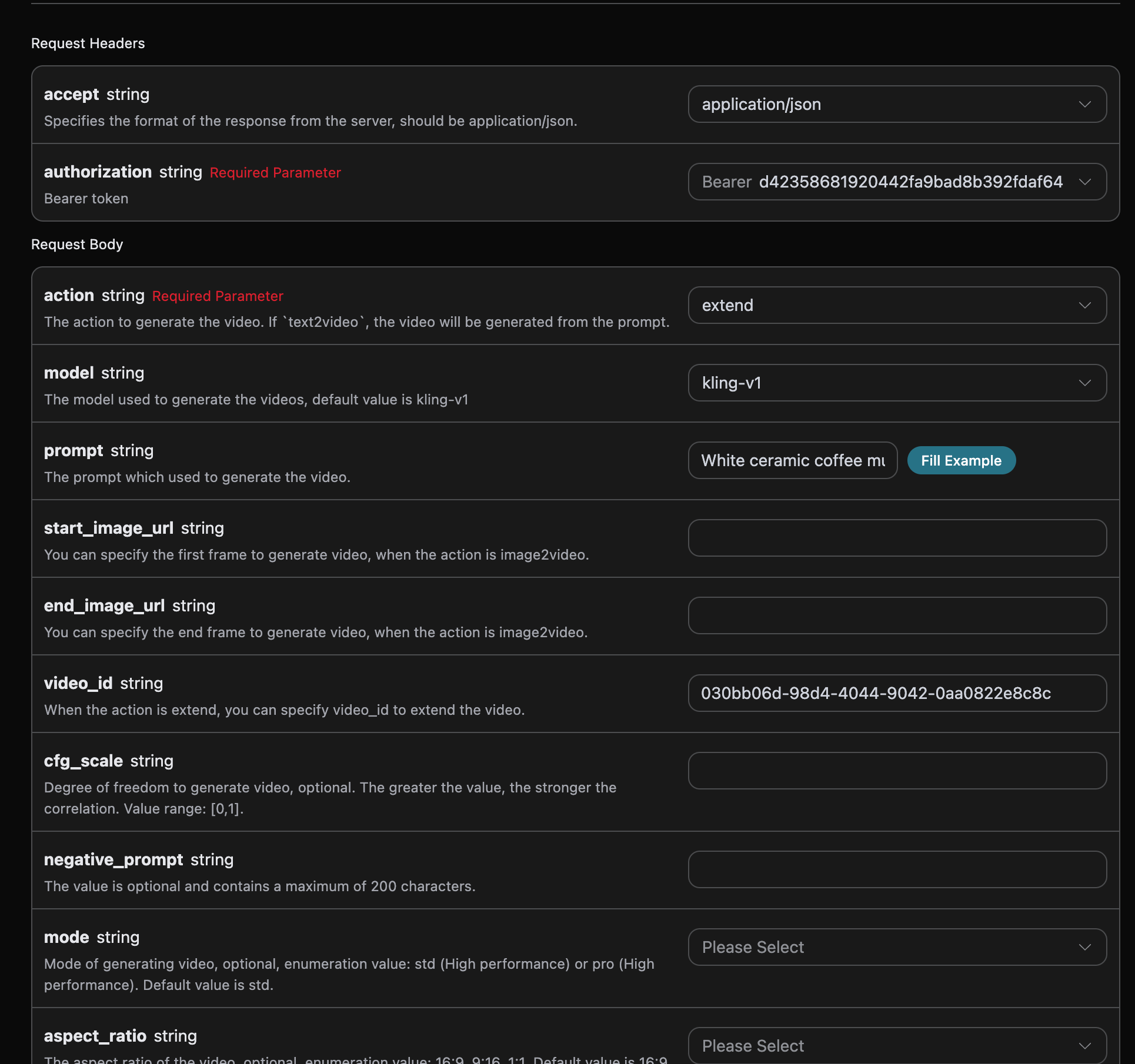
After filling it out, the following code is automatically generated:
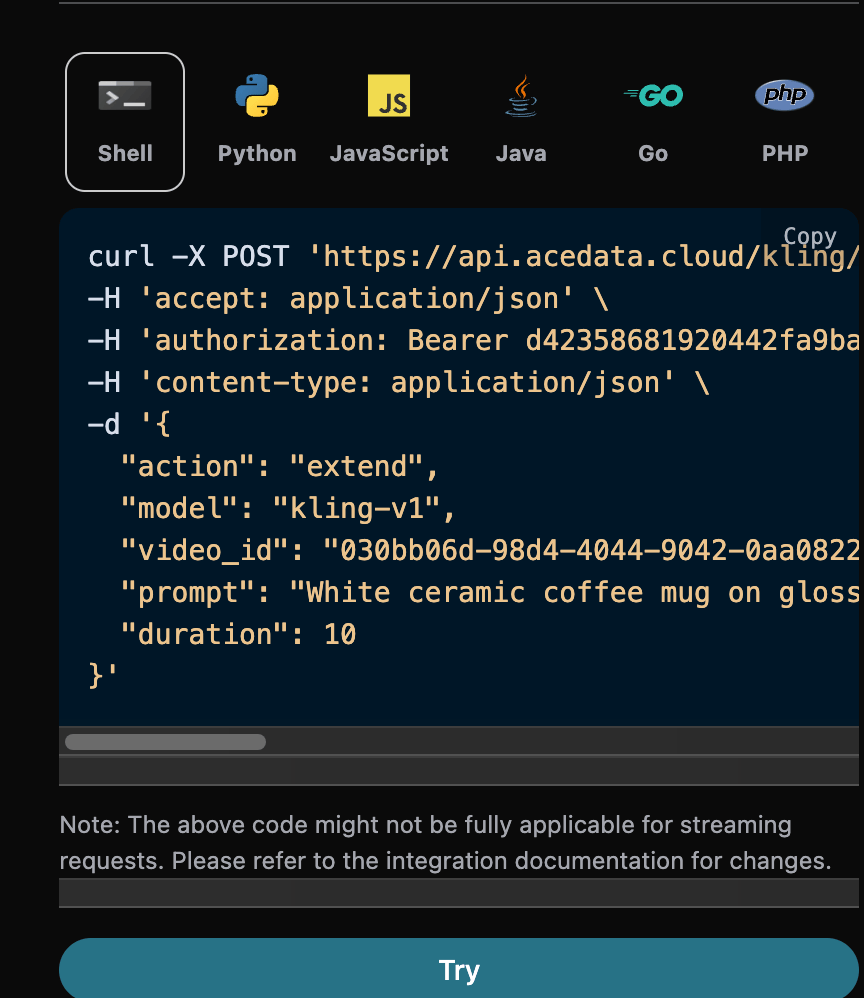
Corresponding Python code:
import requests

url = "https://api.fishapi.cloud/kling/videos"

headers = {
    "accept": "application/json",
    "authorization": "Bearer {token}",
    "content-type": "application/json"
}

payload = {
    "action": "extend",
    "model": "kling-v1",
    "video_id": "030bb06d-98d4-4044-9042-0aa0822e8c8c",
    "prompt": "White ceramic coffee mug on glossy marble countertop with morning window light. Camera slowly rotates 360 degrees around the mug, pausing briefly at the handle.",
    "duration": 10
}

response = requests.post(url, json=payload, headers=headers)
print(response.text)
Click Run, and you can see that you will get a result as follows:
{
  "success": true,
  "video_id": "bbc3b105-ac72-4de2-8390-0cb37dc7d41e",
  "video_url": "https://cdn.acedata.cloud/assets/examples/gemini/04a043bd-6b23-4b4e-945c-ce48158c3eee-3a89912507c7.mp4",
  "duration": "9.6",
  "state": "succeed",
  "task_id": "3ece87e6-3ee3-4f5e-bd70-5ae5eca89a23"
}
It can be seen that the result content is consistent with the above, which implements the video's extended video functionality.
¶ Omni Universal Reference (Video Editing / Reference Video / Multi-Image Reference)
kling-o1 and kling-v3-omni are two independent models, both supporting the "universal reference" capability. Based on text-to-video (action=text2video), reference images or reference videos can additionally be passed in to achieve multi-image reference, reference video, and direct editing of existing videos.
Core convention: Reference materials must be cited in prompt in the form of <<<image_1>>>, <<<video_1>>> (numbering starts from 1), corresponding to the materials at the matching positions in image_list / video_list, for the model to apply these references. If materials are only passed in but not cited in the prompt, they will be ignored.
Security note: The current API does not expose
element_list. Kling Element Library IDs are not tenant-isolated; before an Element Management API providing tenant isolation is available, please useimage_listto pass in subject reference images.
Omni requests do not support negative_prompt, cfg_scale, or camera_control, and cannot use mode=4k. When a reference video is included, generate_audio must be false.
¶ Reference Videos and Video Editing (video_list)
video_list is used to pass in reference videos and is the most commonly used scenario for this capability. The array element fields are as follows:
video_url: Reference video link, cannot be empty. Up to 1 MP4/MOV video, file size ≤200MB, frame rate 24–60fps.kling-o1requires a duration of 3–10 seconds and both width and height of 700–2160px;kling-v3-omnirequires a duration of 3–15.5 seconds, both width and height of 700–4553px, total pixels ≤8,294,400, and aspect ratio 0.4–2.refer_type: Reference type, optionalbase(default, the base video to be edited, i.e., "directly edit the video", where elements can be added/deleted/modified, composition changed, style changed, colors changed, weather changed, etc.) orfeature(feature reference, referencing its style / camera movement / continuation into the next shot).keep_original_sound: Whether to retain the original video audio, optionalyes(retain) orno(remove).
Note: When a reference video exists,
generate_audiomust befalse. A video withrefer_type=basecannot additionally specify a first frame / last frame.
A CURL example for editing an existing video (changing the video to an anime style) is as follows:
curl -X POST 'https://api.fishapi.cloud/kling/videos' \
-H 'accept: application/json' \
-H 'authorization: Bearer {token}' \
-H 'content-type: application/json' \
-d '{
  "action": "text2video",
  "model": "kling-o1",
  "mode": "std",
  "duration": 5,
  "prompt": "把 <<<video_1>>> 改成电影级动漫风格,保留原有的运动和构图",
  "video_list": [
    {
      "video_url": "https://cdn.acedata.cloud/your-reference-video.mp4",
      "refer_type": "base",
      "keep_original_sound": "no"
    }
  ]
}'
¶ Multi-Image Reference (image_list)
image_list is used to pass in reference images (elements / scenes / styles, etc.). The array element fields are as follows:
image_url: Reference image link, cannot be empty. Requirements: .jpg/.jpeg/.png format; file size ≤10MB; shortest side ≥300px; aspect ratio 1:2.5 ~ 2.5:1.type: Optional. When not passed, it is used as a pure reference image; when passed asfirst_frame/end_frame, it is used as the first frame / last frame respectively (equivalent tostart_image_url/end_image_url).
When used, it must be cited in prompt as <<<image_1>>>, <<<image_2>>>. Quantity limits: when no reference video exists, reference images ≤ 7; when a reference video exists, reference images ≤ 4. When only passing the first / last frame, start_image_url / end_image_url can also be directly used, but the last frame must be used together with the first frame.
Note: If both
start_image_url/end_image_urlandimage_listare passed in, the first / last frames will be placed beforeimage_list, which may affect the number correspondence of<<<image_N>>>. It is recommended to choose one of the two: when first / last frames are needed, directly specify them withtypeinimage_list, and do not mix them withstart_image_url/end_image_url.
A CURL example for generating a video with multi-image reference:
curl -X POST 'https://api.fishapi.cloud/kling/videos' \
-H 'accept: application/json' \
-H 'authorization: Bearer {token}' \
-H 'content-type: application/json' \
-d '{
  "action": "text2video",
  "model": "kling-o1",
  "mode": "std",
  "duration": 5,
  "prompt": "让 <<<image_1>>> 里的人物站在 <<<image_2>>> 的场景中,电影感光线",
  "image_list": [
    { "image_url": "https://cdn.acedata.cloud/subject.png" },
    { "image_url": "https://cdn.acedata.cloud/scene.png" }
  ]
}'
¶ Asynchronous Callback
Since the Kling Videos Generation API takes relatively long to generate, approximately 1–2 minutes, if the API does not respond for a long time, the HTTP request will keep the connection open, resulting in additional system resource consumption. Therefore, this API also provides support for asynchronous callbacks.
The overall process is: when the client initiates a request, it additionally specifies a callback_url field. After the client initiates the API request, the API immediately returns a result containing a task_id field, representing the current task ID. When the task is completed, the generated video result will be sent in POST JSON form to the callback_url specified by the client, which also includes the task_id field, so that the task result can be associated through the ID.
Below, we will learn how to operate it specifically through an example.
First, the Webhook callback is a service that can receive HTTP requests. Developers should replace it with the URL of their own deployed HTTP server. For convenience of demonstration, a public Webhook example website https://webhook.site/ is used here. Opening this website will provide a Webhook URL, as shown in the figure:

Copy this URL, and it can be used as a Webhook. The example here is https://webhook.site/624b2c78-6dbd-4618-9d2b-b32eade6d8c3.
Next, we can set the field callback_url to the above Webhook URL and fill in the corresponding parameters. The specific content is shown in the figure:
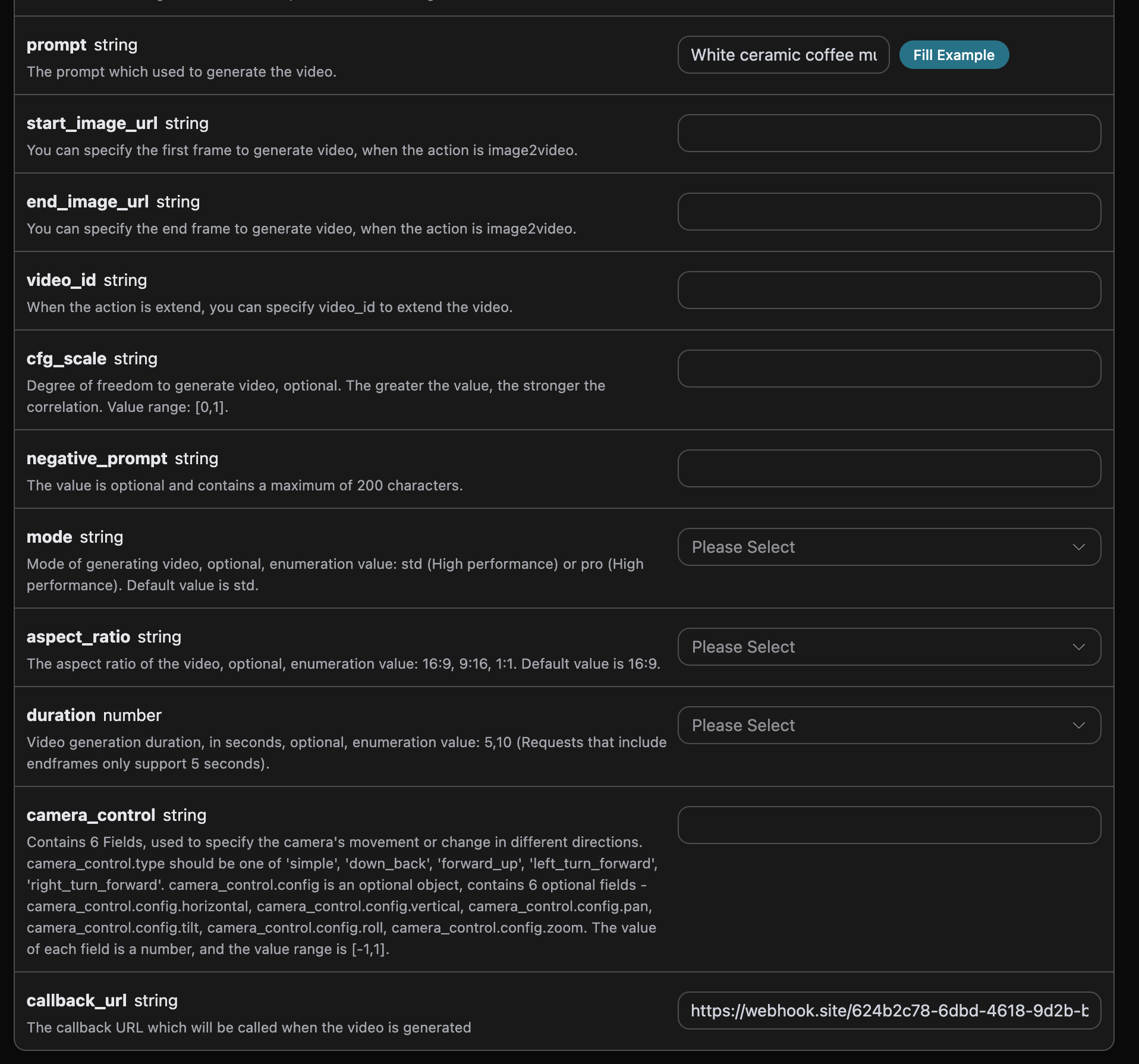
Click Run, and you can find that a result is immediately obtained, as follows:
{
  "task_id": "20068983-0cc9-4c6a-aeb6-9c6a3c668be0"
}
Please wait a moment. We can observe the generated video result at https://webhook.site/624b2c78-6dbd-4618-9d2b-b32eade6d8c3, as shown in the figure:
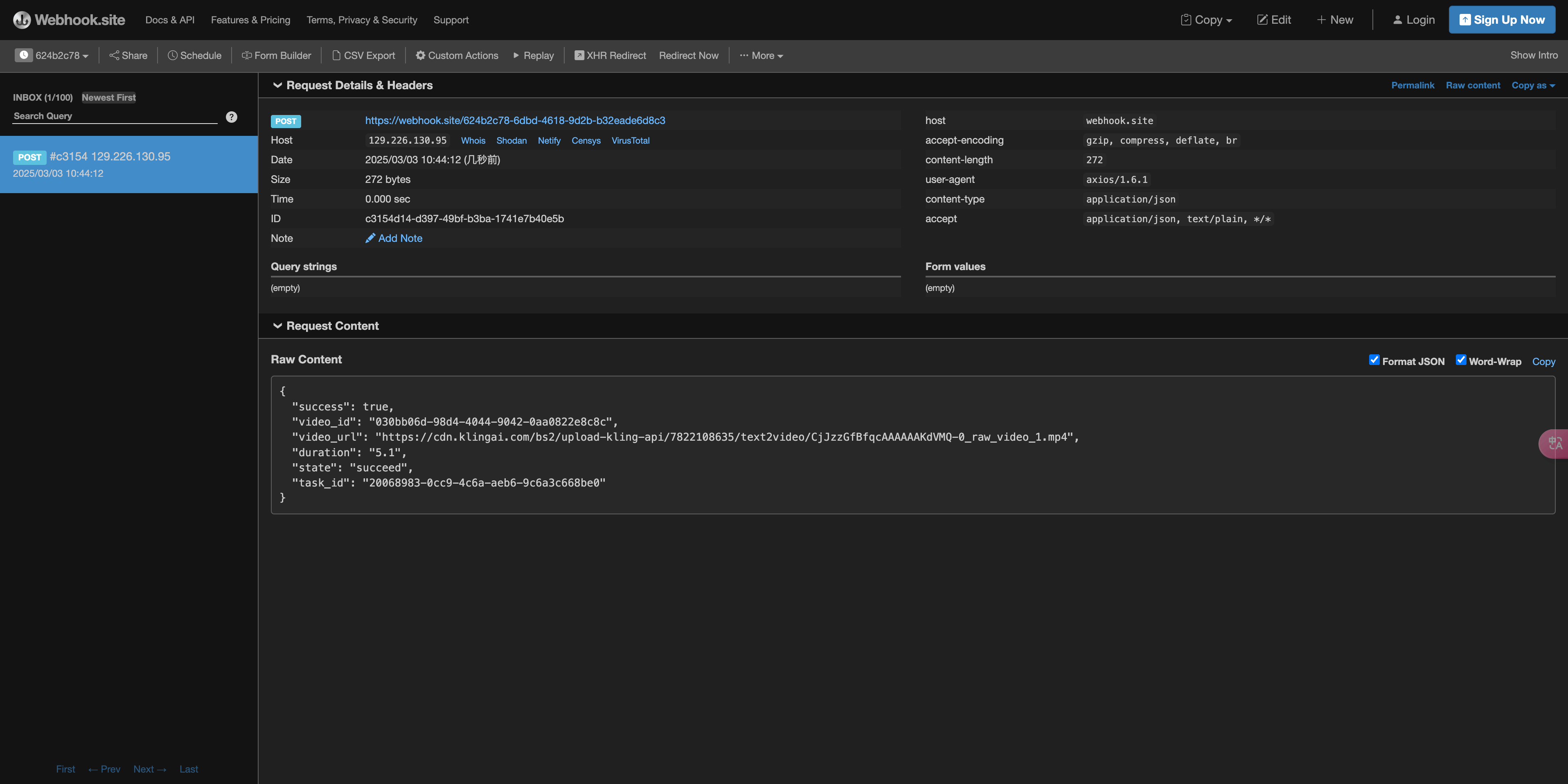
The content is as follows:
{
    "success": true,
    "video_id": "030bb06d-98d4-4044-9042-0aa0822e8c8c",
    "video_url": "https://cdn.acedata.cloud/assets/examples/gemini/04a043bd-6b23-4b4e-945c-ce48158c3eee-3a89912507c7.mp4",
    "duration": "5.1",
    "state": "succeed",
    "task_id": "20068983-0cc9-4c6a-aeb6-9c6a3c668be0"
}
It can be seen that there is a task_id field in the result. The other fields are similar to those above, and task association can be achieved through this field.
¶ Error Handling
When calling the API, if an error occurs, the API will return the corresponding error code and information. For example:
400 token_mismatched: Bad request, possibly due to missing or invalid parameters.400 api_not_implemented: Bad request, possibly due to missing or invalid parameters.401 invalid_token: Unauthorized, invalid or missing authorization token.429 too_many_requests: Too many requests, you have exceeded the rate limit.500 api_error: Internal server error, something went wrong on the server.
¶ Error Response Example
{
  "success": false,
  "error": {
    "code": "api_error",
    "message": "fetch failed"
  },
  "trace_id": "2cf86e86-22a4-46e1-ac2f-032c0f2a4e89"
}
¶ Conclusion
Through this document, you have learned how to use the Kling Videos Generation API to generate videos by entering prompts and first-frame reference images. We hope this document can help you better integrate and use this API. If you have any questions, please feel free to contact our technical support team.
¶ Kling 3.0 Turbo
model="kling-v3-turbo" supports text-to-video and first-frame image-to-video, with durations of integers from 3–15 seconds. mode="std" outputs 720p, and mode="pro" outputs 1080p. This model includes native audio and does not provide a switch to disable it; omit generate_audio or set it to true. This model does not support end frames, camera movement objects, independent negative prompts, or cfg_scale. Please directly describe the content that is needed or should be avoided in prompt.
¶ Multi-Shot Video
kling-v3 and kling-v3-omni support multi_shot=true. shot_type="intelligence" automatically creates shots based on prompt; shot_type="customize" provides 1–6 shots through multi_prompt, with each item containing an index that increases consecutively from 1, a prompt of up to 512 characters, and an integer duration of at least 1 second. The sum of all shot durations must equal the total duration. Custom shots do not use the global prompt. Multi-shot videos are billed based on the selected model, quality, audio configuration, and total duration.